Kaunto

Coming soon · iOS & Android

Counting works

Four ways to log a meal. Pick whichever one is fastest right now — and one ring tells you what's left of the day.

iPhone and Android. Thirteen languages.

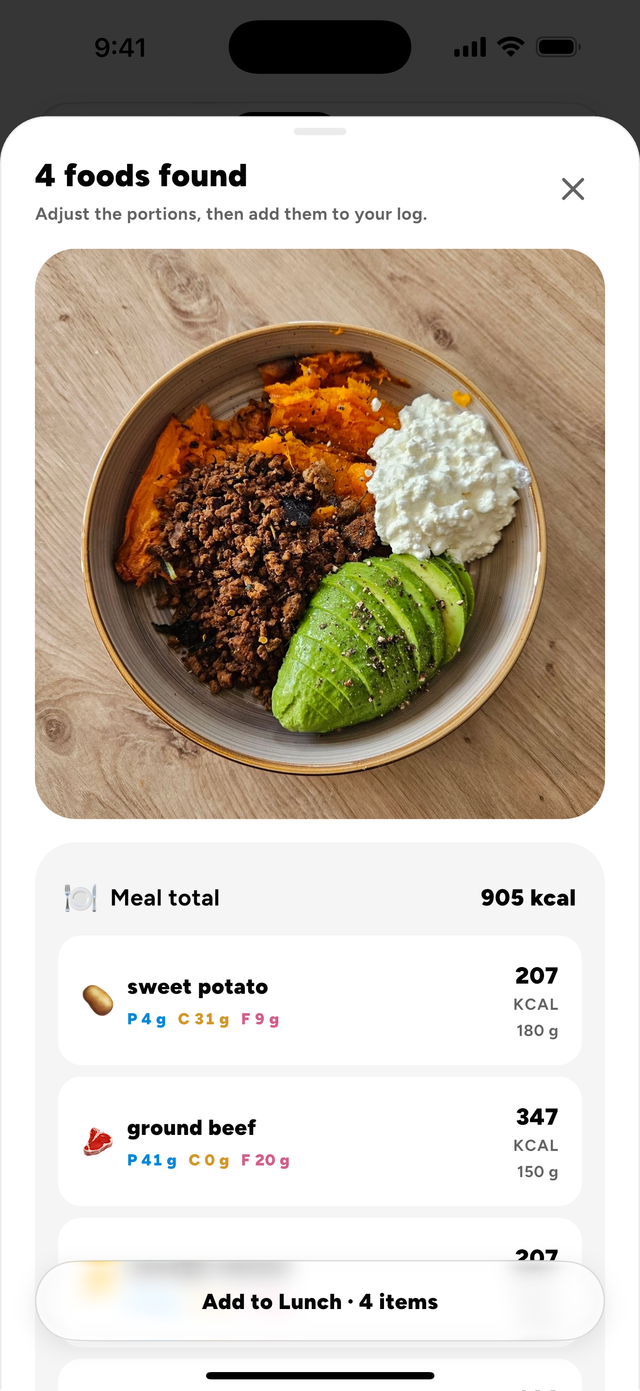
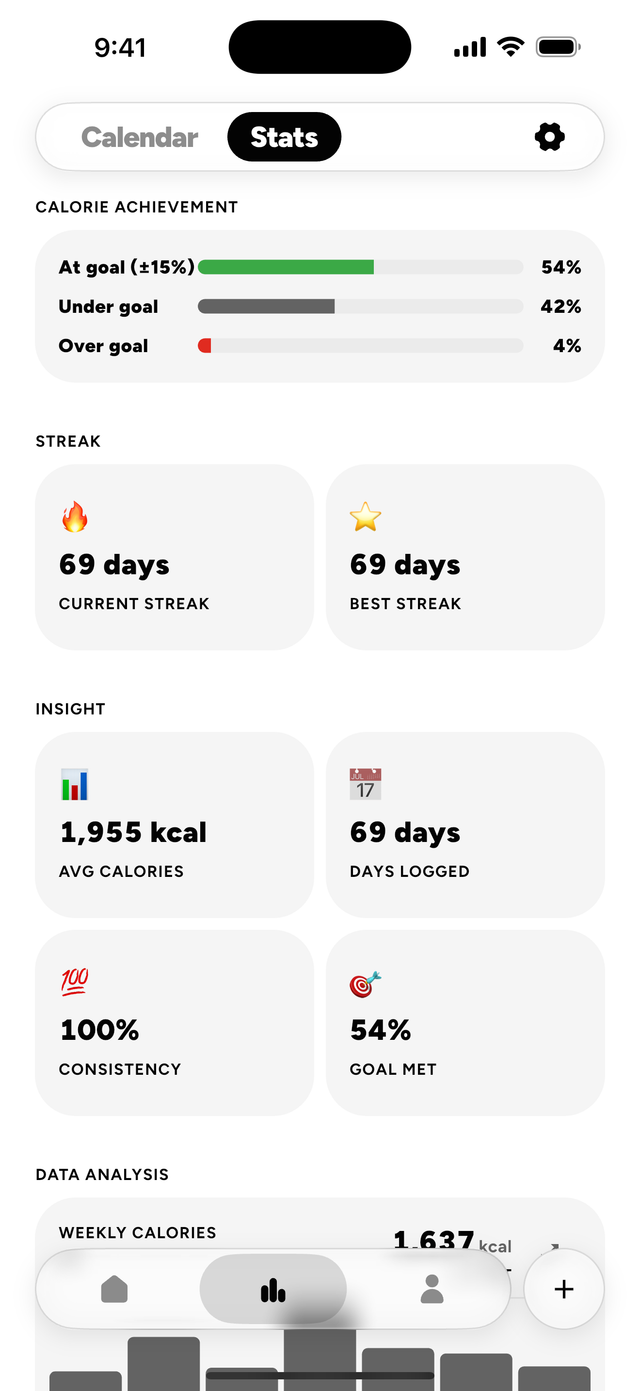
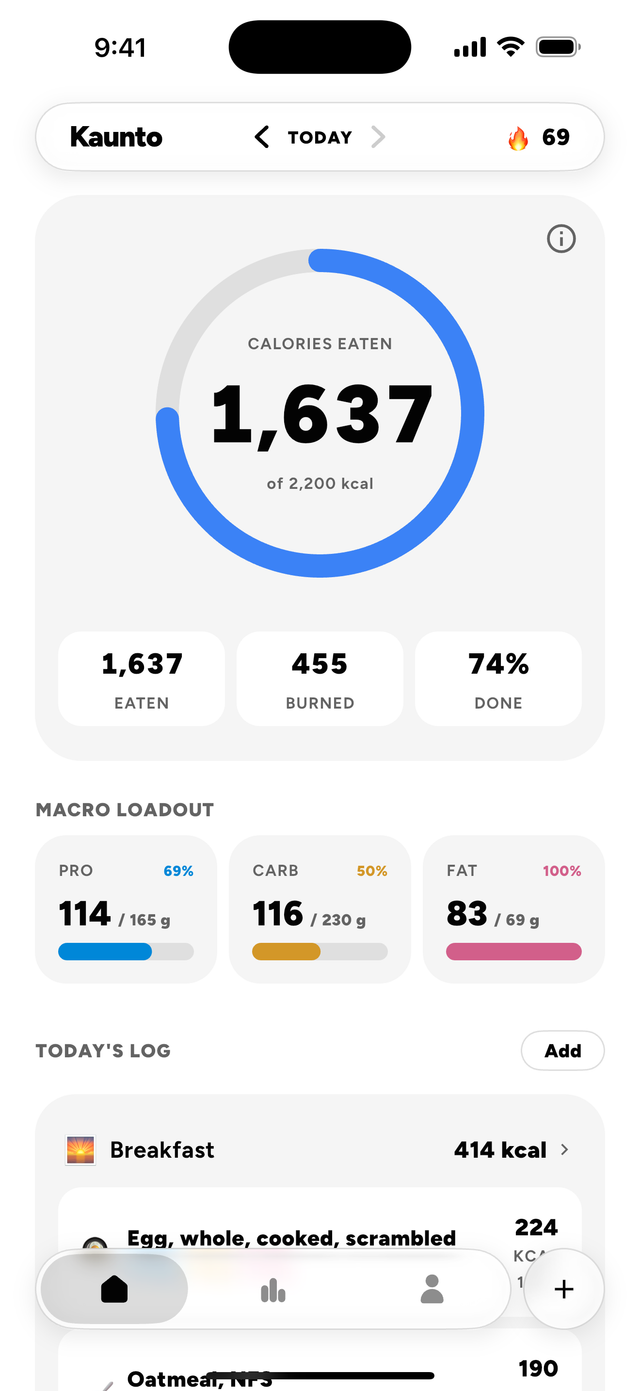
The Kaunto day view: a calorie ring with calories eaten against the goal, eaten, burned and percent done beneath it, separate bars for protein, carbs and fat, then the day’s log starting with breakfast. A photo scan in Kaunto: the photographed bowl, then the four foods found in it, each with its calories, grams and macros, and a button to add all four items to lunch. The Kaunto month calendar: a ring around every day logged, green where the goal was met, and under it the selected day’s intake, filterable by meal. The Kaunto stats dashboard: calorie achievement at, under and over goal, the current and best streak, average calories, days logged, consistency and goal met, then the weekly calorie chart.

The day view

One ring, one number

Your calorie goal, what you've eaten, and what you've burned, in a single figure you can read at arm's length. Protein, carbs and fats each get their own bar underneath.

There is no brand colour in Kaunto. Chrome is black, white and grey throughout, and colour appears in exactly two places — the ring and the macro bars — so the numbers are the only thing shouting.

Calories eaten 1,280 of 2,000 kcal
1,280
Eaten
280
Burned
64%
Done

Macro loadout

Pro 64%
96 / 150g
Carb 60%
120 / 200g
Fat 73%
44 / 60g
Illustration of the day view, drawn with the app's own colours and figures.

Foods

Calories in the food you actually eat

Per portion, not per 100 g, from USDA FoodData Central — the same numbers Kaunto uses when you log them.

All foods →

Features

Six things it does properly

Logging

Log a meal four ways

Search a food database, scan a barcode, photograph the plate, or pull in a recipe you already saved. When one route comes up short, the next one is a tap away — so a missing barcode never becomes a missing entry. Had yesterday's breakfast again? Copy the meal, pick the day and the meal, done.

  • Food search
  • Barcode scan
  • Photo scan
  • Saved recipes
  • Manual entry
  • Copy a meal

Recipes

Recipes that survive real cooking

Import a recipe from a link or build it from its ingredients. Set the cooked weight, and a portion's macros are finally right — the step most trackers skip and the one that makes the numbers wrong.

  • Import from a URL
  • Build from ingredients
  • Cooked-weight yield
  • Log a portion

Health

Your workouts, already counted

Connect Apple Health or Health Connect and your steps, workouts and energy burned arrive on their own — and what you log here goes back the other way, so both stay in step.

  • Steps
  • Active energy
  • Workouts
  • Exercise time
  • Two-way

Insights

Eight cards, in your order

Weekly calories, the macro split, streaks and freezes, calorie achievement and your weight — each card switchable, reorderable, and set to the range you care about. Every weigh-in carries its date, and the weight card draws the trend against your goal.

  • 7d · 30d · 90d · 1y
  • Bar or line
  • Hold to reorder
  • Streaks and freezes

Day details

Any day, in full

Open a day from its ring and it comes apart: what you ate meal by meal, a nutrition-facts table built only from what your foods actually reported, and the energy you burned beside it. Every day in the calendar opens the same way.

  • Meal by meal
  • Nutrition facts
  • Energy
  • Activity

Meal times

It knows which meal it is

Tell it when breakfast, lunch and dinner happen and logging opens on the right one; anything outside those hours is a snack. Reminders come per meal, once a day for your log, and when a streak is at risk.

  • Meal windows
  • Per-meal reminders
  • Daily log
  • Streak at risk

One day

A day nobody added up

Granola for breakfast, pasta at lunch, salmon for dinner, popcorn in front of a film. Eleven ordinary things, nothing fried and nothing from a restaurant, each at a portion USDA itself lists for it. Nobody weighed anything and nobody wrote it down. This is what the day came to.

  1. Breakfast

  2. Lunch

  3. Afternoon

  4. Dinner

  5. Evening

Day total

4,119 kcal

Protein
150 g of 150 g · 100%
Carbs
316 g of 200 g · 158%
Fat
256 g of 60 g · 427%

Every figure is USDA FoodData Central's, for portions USDA lists on that food. The reference day is a scale, not a target; the calculator estimates your own.

How far an estimate drifts, and why counting still works →

Articles

Macros, explained properly

Evidence, worked numbers and the parts most guides skip. Written to hold whichever app you use.

Calculator Work out your calories and macros The Kaunto app's own formula, with its three macro splits. Runs in your browser. Open it →

All articles →

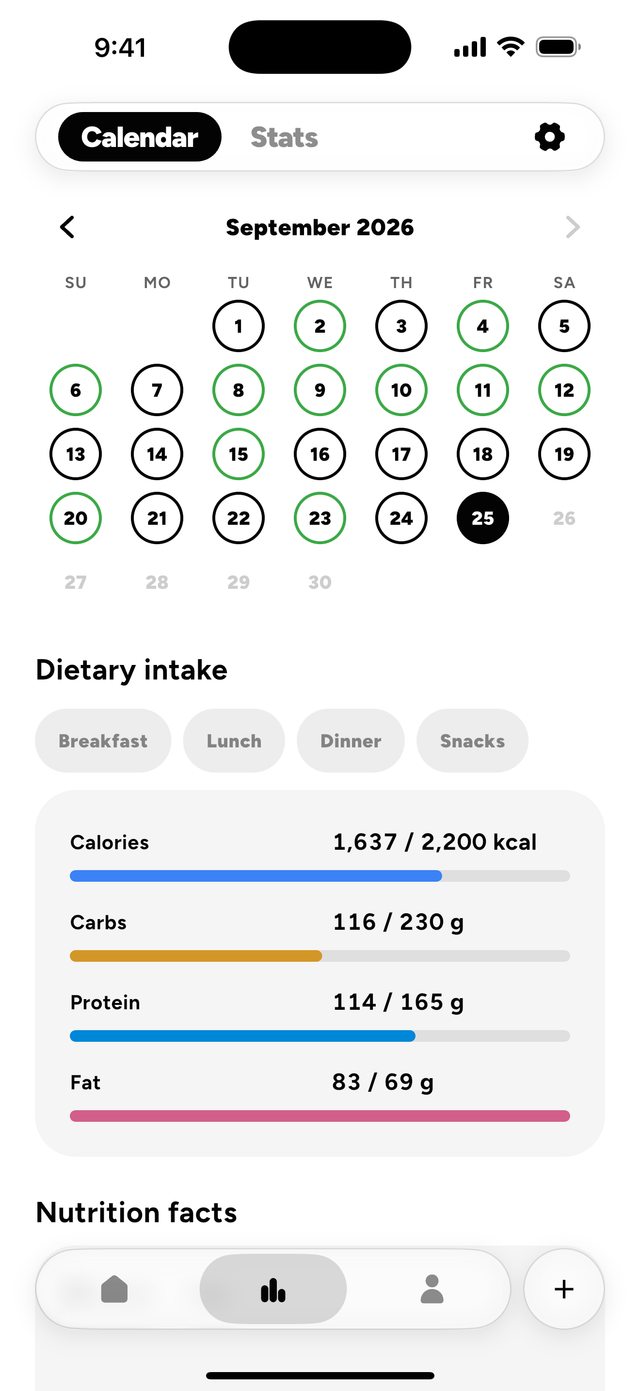
The Kaunto month calendar: a ring around every day logged, green where the goal was met, and under it the selected day’s intake, filterable by meal.

Insights

See the shape of a month

A calendar rings every day you logged, in green where you met your goal. Tap any day and it comes back — what you ate meal by meal, and the nutrition facts of all of it.

  • Logged
  • Goal met
  • Tap any day
  • Month by month

Behind it sits the dashboard — eight card types over seven days, thirty, ninety or a year, as bars or as a line.

Questions

Frequently asked

What is Kaunto?

Kaunto is a macro tracker for iOS and Android. You set a calorie and macro goal once, then log what you eat — by searching a food database, scanning a barcode, photographing a meal, or picking a saved recipe — and the day’s ring tells you how much room is left.

When does Kaunto launch?

It has not been released. There is no App Store or Google Play listing yet.

What does Kaunto cost?

Kaunto is free to use. Some features need an optional subscription, and the App Store and Google Play listings are where its price is stated. There are no ads in the app.

Does Kaunto work offline?

Yes. Entries save on the device and are marked pending while you are offline, with a banner to tell you so, then sync when the connection returns.

What does Kaunto do with Apple Health and Health Connect?

It brings in your steps, active energy burned, exercise time, distance, weight, height and workouts. And it sends back what you log in Kaunto: the workouts and activities you log and the energy they burn, the food you log as nutrition, and your weight and height.

Can I copy a meal to another day?

Yes. Open the meal, choose Copy from its menu, then pick the day — today or any day before it — and which meal it goes into. Clear all empties a meal in one go, and you can undo it.

How do I track my weight?

Log a weigh-in, with its date, from Profile or from the weight card in Stats; the card draws the trend against your goal weight. With Apple Health or Health Connect connected, Kaunto saves your weigh-ins there too and the first sync brings in weigh-ins from up to the last 90 days.

Who can see the foods I create?

Only you. Foods you create are private to your account; open one and tap Edit to change or delete it. Anything you have already logged keeps its values.

What is a streak freeze?

A freeze covers a day you miss, so the streak survives it. You earn them by keeping your streak going, and you can hold up to five.

What languages does Kaunto speak?

Thirteen, switchable in the app, with every screen translated: English, Español, Português, Français, Deutsch, Italiano, Nederlands, Polski, Română, Svenska, Norsk, Suomi and Türkçe. That is the app interface; the legal documents are in English.

Is there a minimum age?

Yes, 16.

Does Kaunto give nutrition advice?

No. It sets no diet, recommends no meals, and never comments on your food choices. It counts, and it shows you the count.

Counting works

Coming to iOS and Android. Work out your macros in the meantime.